What is WalletConnect and Why Use It?
WalletConnect is an open protocol that allows you to securely connect your crypto wallet to decentralized applications (dApps) and third-party services. Instead of typing your private keys or seed phrases into unknown websites, you simply approve the connection and transactions directly in your wallet.
Stay turned with the latest news and updates by joining us on Twitter.
— @GuardaWallet
Key benefits of WalletConnect:
-
Enhanced Security: Your private keys never leave your wallet. All approvals happen on your side.
-
Convenience: Connecting is as simple as scanning a QR code or approving a pop-up request.
-
Wide Compatibility: It works with thousands of dApps, DeFi platforms, NFT marketplaces, and payment gateways.
-
Flexibility: You can connect from both desktop and mobile wallets seamlessly.
When paired with Guarda Wallet, WalletConnect enables you to easily pay for goods and services in ETH on external websites—without ever compromising your keys or leaving the familiar Guarda interface.
Step-by-Step Guide: Using WalletConnect in Guarda Wallet to Pay in ETH
1. Find the “Connect Wallet” button on the third-party service
Most websites or dApps that support WalletConnect will show a button like “Connect Wallet”, “Connect”, or “WalletConnect”.
2. Get the WalletConnect QR code or link
- If you’re using Guarda Mobile, simply scan the QR code shown on the website.
- If you’re using Guarda Web App, the third-party service will give you a WalletConnect link (URI) instead. Copy this link.
3. Open the WalletConnect section in Guarda Web App
In the web version of Guarda, click on the WalletConnect section. You’ll find the button to open it near the Settings menu in the top bar of the app.

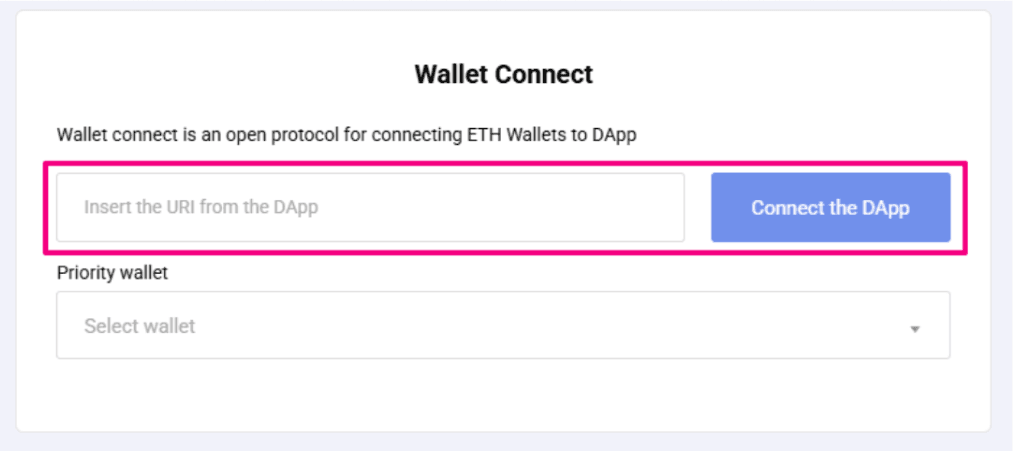
4. Paste the WalletConnect URI and choose your ETH wallet
In the WalletConnect section, paste the copied connection link (URI). Then select the ETH wallet you want to use for the transaction from the dropdown list. Click Connect DApp.
5. Connection is established
The third-party application should now successfully connect to your ETH wallet in Guarda Wallet.
6. Approve transactions in Guarda Wallet
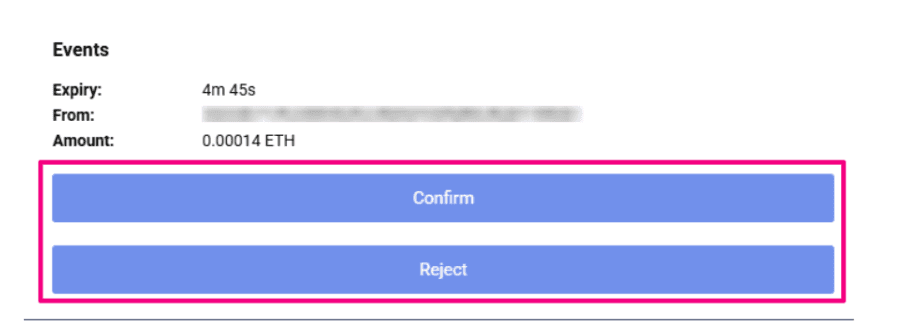
When you make a payment or perform an action on the connected third-party service, the transaction will appear in Guarda Wallet under the WalletConnect section.
- Review the transaction details carefully.
- Confirm (sign) it in Guarda to complete the operation.
Done!
You’re now securely connected to the external service and can pay in ETH without exposing your private keys.


FAQ: Common Questions about WalletConnect in Guarda
1. What if the connection doesn’t work?
- Make sure your internet connection is stable.
- Refresh the third-party site and try reconnecting.
- If using Web Wallet, double-check you copied the correct WalletConnect URI.
2. Can I disconnect after using WalletConnect?
Yes. In the WalletConnect section of Guarda, you can manually disconnect from any active session. This is recommended after completing your payment.
3. Is it safe to connect to any site with WalletConnect?
WalletConnect itself is secure, but always verify the site you’re connecting to. Avoid suspicious or untrusted platforms.
4. Does WalletConnect share my private keys?
No. WalletConnect only creates a secure session. Your private keys always stay inside Guarda Wallet and are never shared.